 About my projects, examples and tutorials

Description
A file chooser dialog, suitable for “File/Open” or “File/Save” commands
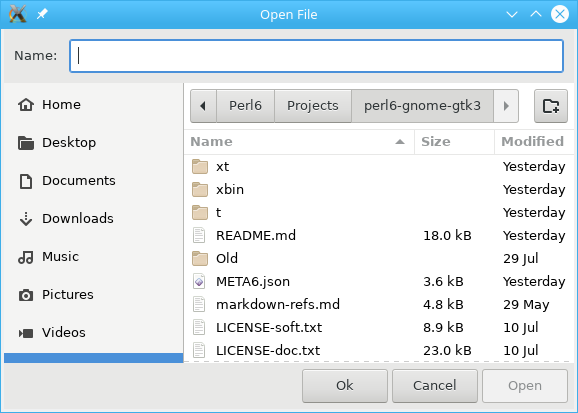
Gnome::Gtk3::FileChooserDialog is a dialog box suitable for use with “File/Open” or “File/Save as” commands. This widget works by putting a Gnome::Gtk3::FileChooserWidget inside a Gnome::Gtk3::Dialog. It exposes the Gnome::Gtk3::FileChooser interface, so you can use all of the Gnome::Gtk3::FileChooser functions on the file chooser dialog as well as those for Gnome::Gtk3::Dialog.
Note that Gnome::Gtk3::FileChooserDialog does not have any methods of its own. Instead, you should use the functions that work on a Gnome::Gtk3::FileChooser.
If you want to integrate well with the platform you should use the Gnome::Gtk3::FileChooserNative API, which will use a platform-specific dialog if available and fall back to Gnome::Gtk3::FileChooserDialog otherwise.
Typical usage
In the simplest of cases, you can use a Gnome::Gtk3::FileChooserDialog to select a file for opening:
my Gnome::Gtk3::FileChooserDialog $dialog .= new(
  :title("Open File"), :parent($top-window),
  :action(GTK_FILE_CHOOSER_ACTION_OPEN),
  :button-spec( [
      "_Cancel", GTK_RESPONSE_CANCEL,
      "_Open", GTK_RESPONSE_ACCEPT
    ]
  )
);

my $response = $dialog.gtk-dialog-run;
$dialog.gtk-widget-hide;
if $response ~~ GTK_RESPONSE_ACCEPT {
  my Str $file = $dialog.get-filename;
  note "Opening file $file";
}
To use a dialog for saving, you can use this:
my Gnome::Gtk3::FileChooserDialog $dialog .= new(
  :title("Open File"), :parent($top-window),
  :action(GTK_FILE_CHOOSER_ACTION_SAVE),
  :button-spec( [
      "_Cancel", GTK_RESPONSE_CANCEL,
      "_Open", GTK_RESPONSE_ACCEPT
    ]
  )
);

$dialog.set-do-overwrite-confirmation(1);

if $user-edited-a-new-document {
  $dialog.set_current_name("Untitled document");
}

else {
  $dialog.set_filename($existing-filename);
}

my $response = $dialog.gtk-dialog-run;
$dialog.gtk-widget-hide;
if $response ~~ GTK_RESPONSE_ACCEPT {
  my Str $file = $dialog.get-filename;
  note "Saving to file $file";
}

$dialog.gtk-widget-destroy;
Setting up a file chooser dialog
There are various cases in which you may need to use a Gnome::Gtk3::FileChooserDialog:
- To select a file for opening. Use GTK_FILE_CHOOSER_ACTION_OPEN.
- To save a file for the first time. Use GTK_FILE_CHOOSER_ACTION_SAVE, and suggest a name such as “Untitled” with gtk_file_chooser_set_current_name().
- To save a file under a different name. Use GTK_FILE_CHOOSER_ACTION_SAVE, and set the existing filename with gtk_file_chooser_set_filename().
- To choose a folder instead of a file. Use GTK_FILE_CHOOSER_ACTION_SELECT_FOLDER.
Note that old versions of the file chooser’s documentation suggested using gtk_file_chooser_set_current_folder() in various situations, with the intention of letting the application suggest a reasonable default folder. This is no longer considered to be a good policy, as now the file chooser is able to make good suggestions on its own. In general, you should only cause the file chooser to show a specific folder when it is appropriate to use gtk_file_chooser_set_filename(), i.e. when you are doing a Save As command and you already have a file saved somewhere.
Response Codes
Gnome::Gtk3::FileChooserDialog inherits from Gnome::Gtk3::Dialog, so buttons that go in its action area have response codes such as GTK_RESPONSE_ACCEPT and GTK_RESPONSE_CANCEL. For example, you could create a dialog window as follows;
my Gnome::Gtk3::FileChooserDialog $dialog .= new(
  :title("Open File"), :parent($top-window),
  :action(GTK_FILE_CHOOSER_ACTION_OPEN),
  :button-spec( [
      "_Cancel", GTK_RESPONSE_CANCEL,
      "_Open", GTK_RESPONSE_ACCEPT
    ]
  )
);
This will create buttons for “Cancel” and “Open” that use stock response identifiers from ResponseType from Gnome::Gtk3::Dialog. For most dialog boxes you can use your own custom response codes rather than the ones in ResponseType, but Gnome::Gtk3::FileChooserDialog assumes that its “accept”-type action, e.g. an “Open” or “Save” button, will have one of the following response codes:
GTK_RESPONSE_ACCEPT
GTK_RESPONSE_OK
GTK_RESPONSE_YES
GTK_RESPONSE_APPLY
This is because Gnome::Gtk3::FileChooserDialog must intercept responses and switch to folders if appropriate, rather than letting the dialog terminate — the implementation uses these known response codes to know which responses can be blocked if appropriate.
To summarize, make sure you use a ResponseType when you use Gnome::Gtk3::FileChooserDialog to ensure proper operation.
See Also
Gnome::Gtk3::FileChooser, Gnome::Gtk3::Dialog.
Synopsis
Declaration
unit class Gnome::Gtk3::FileChooserDialog;
also is Gnome::Gtk3::Dialog;
also does Gnome::Gtk3::FileChooser;
Example
An example using builder
use Gnome::Gtk3::Dialog:api<1>;
use Gnome::Gtk3::FileChooserDialog:api<1>;

my Gnome::Gtk3::FileChooserDialog $fchoose .= new(:build-id<save-dialog>);

# show the dialog
my Int $response = $fchoose.gtk-dialog-run;
if $response ~~ GTK_RESPONSE_ACCEPT {
  ...
}

# when dialog buttons are pressed hide it again
$fchoose.hide;
Methods
new
multi method new ( GtkFileChooserAction :$action! )
Creates a new file chooser dialog. This function is analogous to Gnome::Gtk3::Dialog.new( :$title, :$parent, :$flags, :$buttons-spec). This method is called when creating the object using .new(:action(...), ...).
Returns: a new native file chooser dialog.
Since: 2.4
method gtk_file_chooser_dialog_new (
  Str $title, N-GObject $parent, GtkFileChooserAction $action,
  *@buttons-spec
  --> N-GObject
)
Str $title; Title of the dialog, or
Any.N-GObject $parent; Transient parent of the dialog, or
Any.GtkFileChooserAction $action; Open or save mode for the dialog.
*@buttons-spec is a list button specifications. The list has an even number of members of which;
Str $button-label to go on the button.
$response-code, an Int, GtkResponseType or other enum (with int values) to return for the button. Taking a GtkResponseType will help the chooser dialog make a proper decision if needed. Otherwise, the user can always check codes returned by the dialog to find out what to do next.
multi method new (
  GtkFileChooserAction :$action!, Str :$title, Gnome::GObject::Object $parent,
  List :$buttons-spec
)
Create an object using a native object from elsewhere. See also gtk_file_chooser_dialog_new() below.
multi method new ( N-GObject :$native-object! )
Create an object using a native object from elsewhere. See also Gnome::GObject::Object.
multi method new ( Str :$build-id! )
Create an object using a native object from a builder. See also Gnome::GObject::Object.
[gtk_] file_chooser_dialog_new
Creates a new file chooser dialog. This function is analogous to gtk_dialog_new_with_buttons(). This method is called when creating the object using .new(:action(...), ...).
Returns: a new native file chooser dialog.
Since: 2.4
method gtk_file_chooser_dialog_new (
  Str $title, N-GObject $parent, GtkFileChooserAction $action,
  *@buttons-spec
  --> N-GObject
)
Str $title; Title of the dialog, or
Any.N-GObject $parent; Transient parent of the dialog, or
Any.GtkFileChooserAction $action; Open or save mode for the dialog.
*@buttons-spec is a list button specifications. The list has an even number of members of which;
Str $button-label to go on the button.
$response-code, an Int, GtkResponseType or other enum (with int values) to return for the button. Taking a GtkResponseType will help the chooser dialog make a proper decision if needed. Otherwise, the user can always check codes returned by the dialog to find out what to do next.